
Automatic Meeting Invitations
If your calendar is synced with Garba, it will automatically join the meetings you choose under What meetings should Garba join?:
Go to Settings > User > Settings.
Under What meetings should Garba join?, choose one of:
All meetings with a web conferencing link
Only meetings with people from my company
Only meetings with people outside my company (default)
Only when I manually invite Garba
Garba only joins meetings that have a web conferencing link and at least one other attendee. Notetaker bots from Gong, Fireflies, Sembly, MeetGeek, Oliv, Control.dev and Recall.ai do not count as attendees, so a meeting with your colleagues and a Gong notetaker is internal. Bots from other recording tools still count as attendees. When you change the setting, Garba applies it to the meetings already in your calendar too.
Garba also looks at who has accepted:
If you decline a meeting, Garba doesn't join it on your behalf.
If everyone else declines, Garba doesn't join, since there is nobody to record.
People who declined don't count when Garba decides whether a meeting is internal or external. If only the customer declines, the meeting is treated as internal.
People who haven't answered, or answered maybe, still count as attending.
To record one of these meetings anyway, turn on its Record switch in Calendar.
Manually Inviting Garba
If you haven’t synced your calendar, you can manually invite Garba to a meeting that is in progress.
Viewing Scheduled Meetings
To check which meetings Garba is set to join:
Navigate to Calendar
View the calendar to see scheduled recordings
Preventing Garba from Joining a Meeting
If Garba is set to join a meeting but you don’t want it to record, simply toggle off the "Record" switch on that meeting. You can also toggle it on for a meeting Garba wasn't going to join. The switch can be changed until the meeting starts.
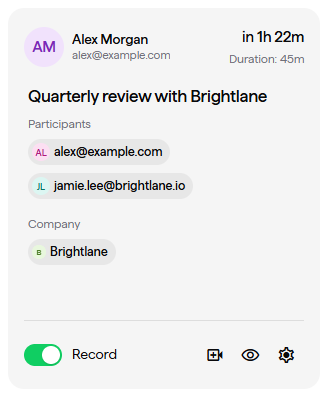
This ensures you have full control over which meetings are recorded!