With the Deal & Pipeline analysis feature in Garba, every deal from your CRM is automatically analyzed using AI.
Garba connects to your CRM and imports your pipelines, stages, and deals, then keeps them current - new or changed deals appear in Garba within minutes, and deals deleted in your CRM are removed automatically.
Two time windows matter, and they are different:
Import window (12 months). Garba imports deals closed or opened/modified in the last 12 months so your pipeline is fully represented.
Evidence window (90 days). When scoring, Garba only draws on conversations from the last 90 days. Older meetings and emails stay viewable in Garba but don't influence scores.
Who sees what: Admins see all pipelines and deals; Managers see deals owned by their team members; Users see only their own deals. These same boundaries apply to the owner and team filters in Step 3.
Sync your email first. Many of the strongest signals about deal progress live in email threads. Connect your email integration before you activate scoring so the first run has that evidence to work with.
Once the feature has been activated on your account, go to Setup → Configuration → Deal Scoring.
Scoring framework — choose the framework Garba grades your deals against (e.g. MEDDPICC, BANT, SPICED). Each framework defines a set of criteria, such as Economic Buyer, Decision Criteria, or Identify Pain.
Enable CRM sync (optional, recommended) — when on, Garba writes scoring results back to fields on your CRM deal records and updates them automatically as soon as a new signal comes in.
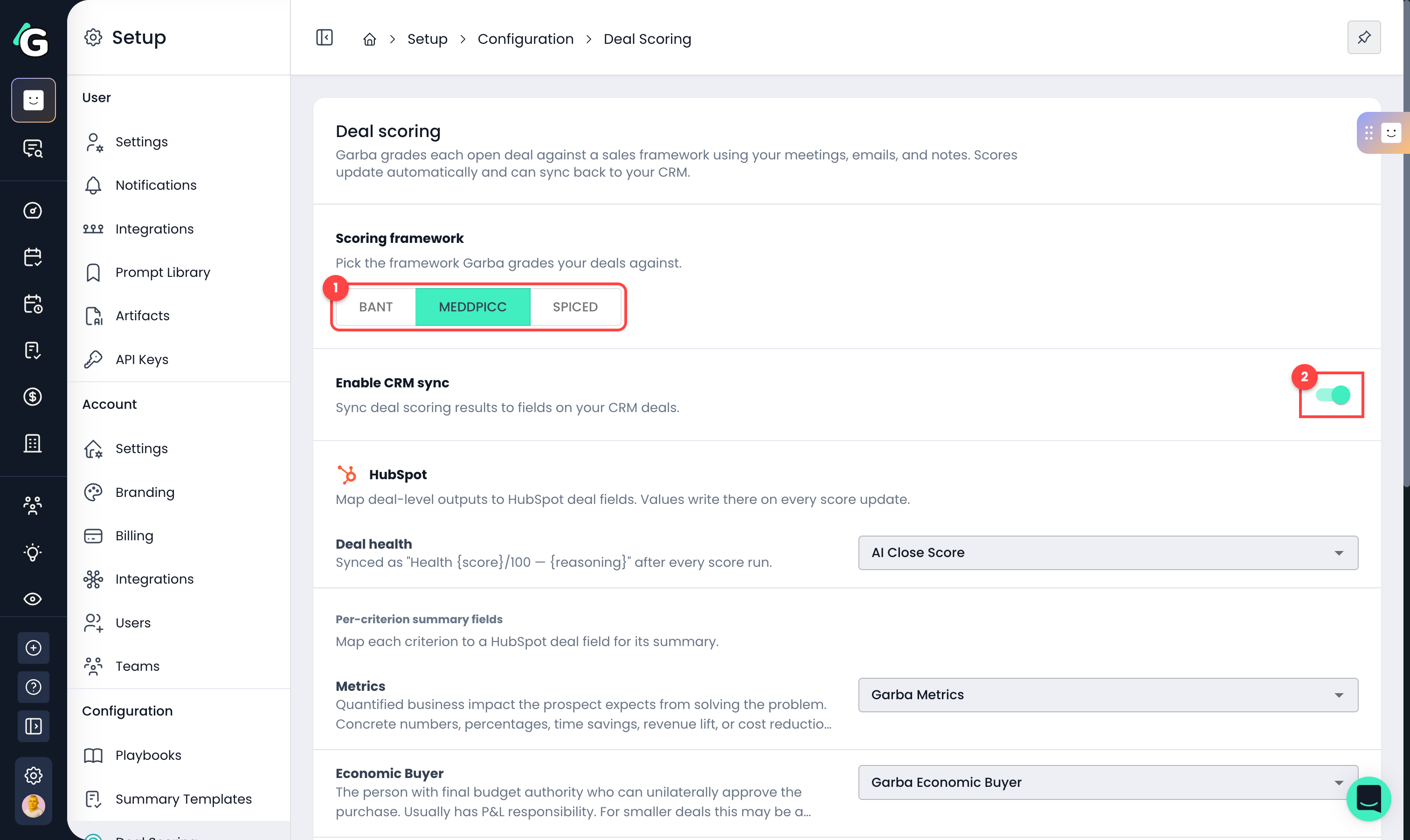
If you enable CRM sync, you'll map each analysis property to a specific field on your CRM deal records. You may need to create those fields before continuing.
Switching frameworks later keeps all past evidence available for audit, but new scoring uses the new framework's criteria.
The first scoring run can only learn from conversations Garba can attach to your deals. To get the most out of the backfill, check these before clicking Start scoring:
Contacts on their deals — in your CRM, make sure the people you're talking to are saved as contacts and associated with the right deals. That association is how Garba routes each conversation to its deal — a meeting whose participants aren't contacts on any deal won't contribute evidence.
Email integration enabled — if you want email threads to count toward scoring, the email integration must be connected (Setup → Account → Integrations) so Garba has the emails to begin with. The same goes for your phone system if you want calls included.
Evidence window — the backfill covers conversations from the last 90 days by default. Older meetings and emails stay viewable in Garba but won't influence scores.
Then click Start scoring (or Save when editing). On first setup, Garba backfills your pipeline: it walks through your open deals, links past meetings, calls, and emails to them, extracts evidence against the framework criteria, and scores each deal. This usually takes a while - scores appear on your deals as they come in.
Go to Listen → Deals to see all your deals with their scores.
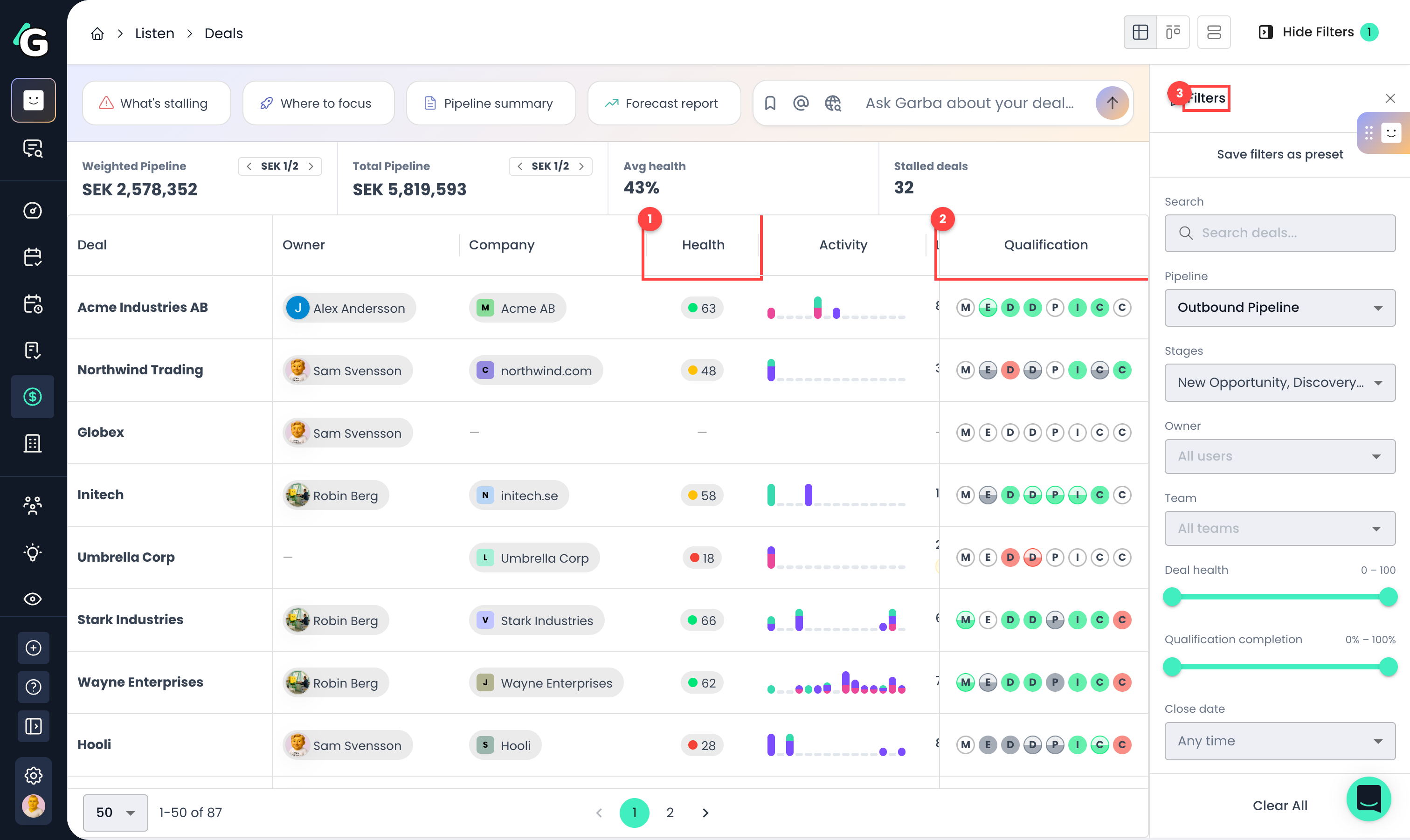
Health — each deal's health score 0–100, color-coded from red (at risk) to green (healthy). Hover for the band, the reasoning behind the score, and the score trend over time.
Qualification — one circle per framework criterion. Fill shows how much is known (empty = not discussed, half = partial, full = confirmed) and colour shows fit (green = favours you, red = against you).
Filters — slice the pipeline by pipeline and stage, owner, team, health range, qualification completion, close date, or stale deals only.
The numbers above the list cover open deals only — Won and Lost deals are excluded:
Weighted Pipeline — each open deal's amount multiplied by its health score. A SEK 50,000 deal at health 60 contributes SEK 30,000. Think of it as a health-weighted view of what the pipeline is really worth.
Total Pipeline — the plain sum of open deal amounts in the displayed currency. If your deals span several currencies, the arrows page through them ("SEK 1/2" means you're viewing the first of two currencies).
Avg health — the average health score across all scored open deals.
Stalled deals — the number of deals with no meetings or emails in the last 14 days and no upcoming meeting booked. A booked future meeting keeps a deal out of the stalled count even if it's been quiet. Stalled deals also get a "Stale" chip on their row.
Click any deal to see the full picture.
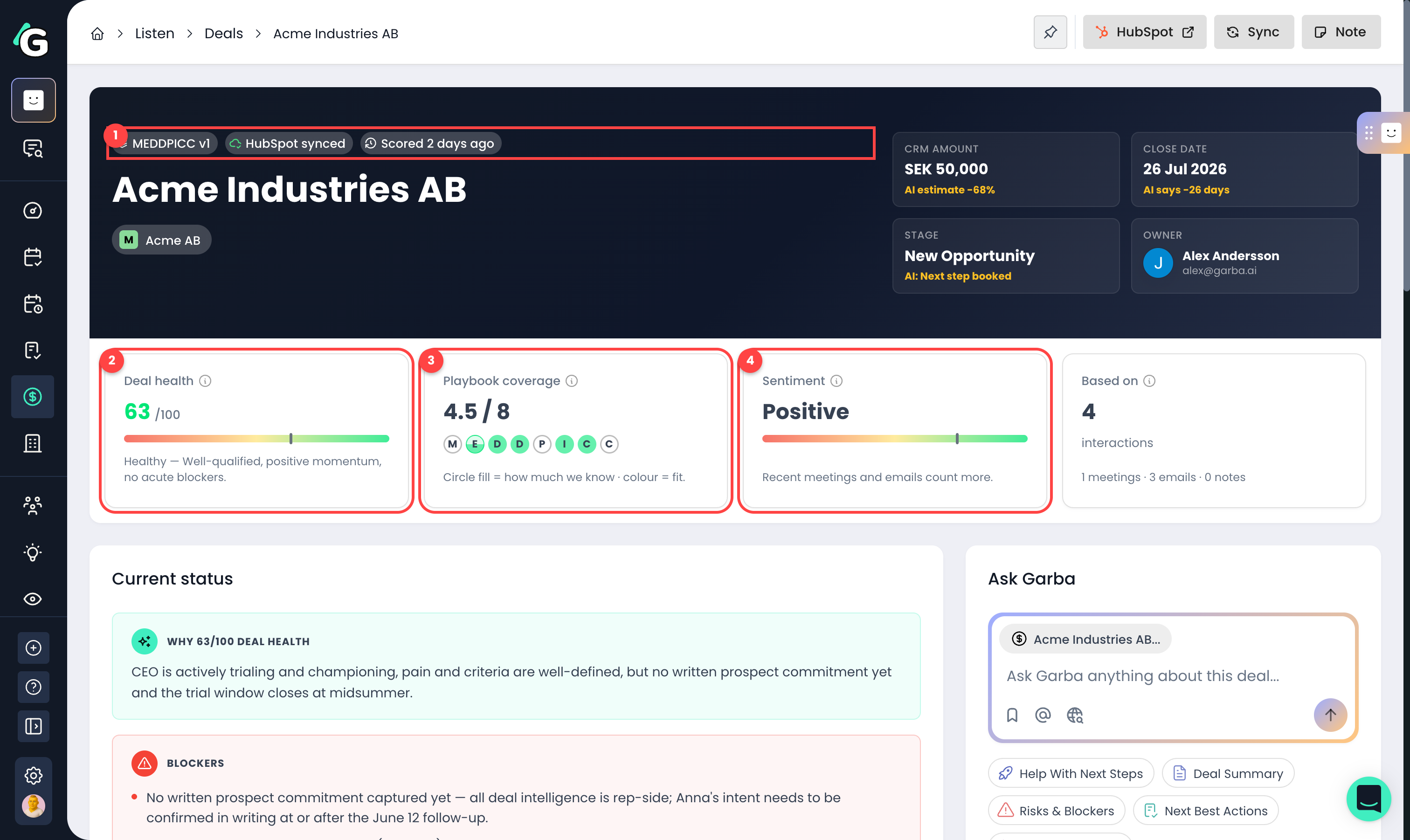
Status chips — which framework and version scored the deal, the CRM sync state (e.g. "HubSpot synced"), and the scoring activity (see below).
Deal health — the 0–100 score with its band label. The tooltip explains: health reflects qualification depth, sentiment, engagement, and momentum — independent of any close-date forecast.
Playbook coverage — how thoroughly the deal has been qualified. Items count half once there's evidence, and fully once the prospect confirms — so "4.5 / 8" means four criteria confirmed and one partially covered. Coverage measures completeness only; the circle colour carries fit.
Sentiment — how positive the buyer's signals have been across the deal. Recent meetings and emails count more than older ones; mixed signals show as neutral.
A small +/− delta badge next to any of these numbers shows the change since the previous score run.
0–30 · At risk — qualification thin, signals negative, or a hard blocker present.
31–60 · Developing — in progress, with material gaps.
61–80 · Healthy — well-qualified, positive momentum, no acute blockers.
81–100 · Strong — best-in-pipeline; only execution remains.
Sentiment is measured on a −1 to +1 scale and shown as a label:
Very positive (above +0.6) · Positive (+0.2 to +0.6) · Mixed (−0.2 to +0.2) · Negative (−0.6 to −0.2) · Very negative (below −0.6).
Next to the CRM amount, close date, and stage, Garba shows what the conversations actually support:
AI confirmed — the AI's estimate matches the CRM value (within 1% for amount, within a day for close date, same stage).
AI estimate +15% (or −X%) — the AI reads the amount as higher or lower than what's in the CRM. The tooltip shows the estimated figure and the reasoning.
AI says +10 days (or −X days / ±X mo) — the AI predicts an earlier or later close than the CRM date.
AI: [stage name] — the AI reads the deal as sitting in a different stage than the CRM says.
AI: no estimate — the deal was scored, but the conversations don't reference a concrete number, timeline, or stage to estimate from.
The chips in the deal header tell you where the deal is in the scoring cycle:
Extracting — Garba is pulling signal from a new meeting, call, email, or note. The score refreshes automatically when it's done.
Scoring — new evidence is being merged into the deal score.
Scoring deferred — your team has used today's deal-scoring budget. New evidence is queued and scores automatically once the 24-hour window opens up.
Narrative updating / Generating summary… — the numeric score is in; the plain-English summary, health reasoning, and estimates are generated in a separate pass and land a moment later.
Scored X ago — when the deal was last fully scored; hover for the score history.
The Current status card explains the score in plain language.
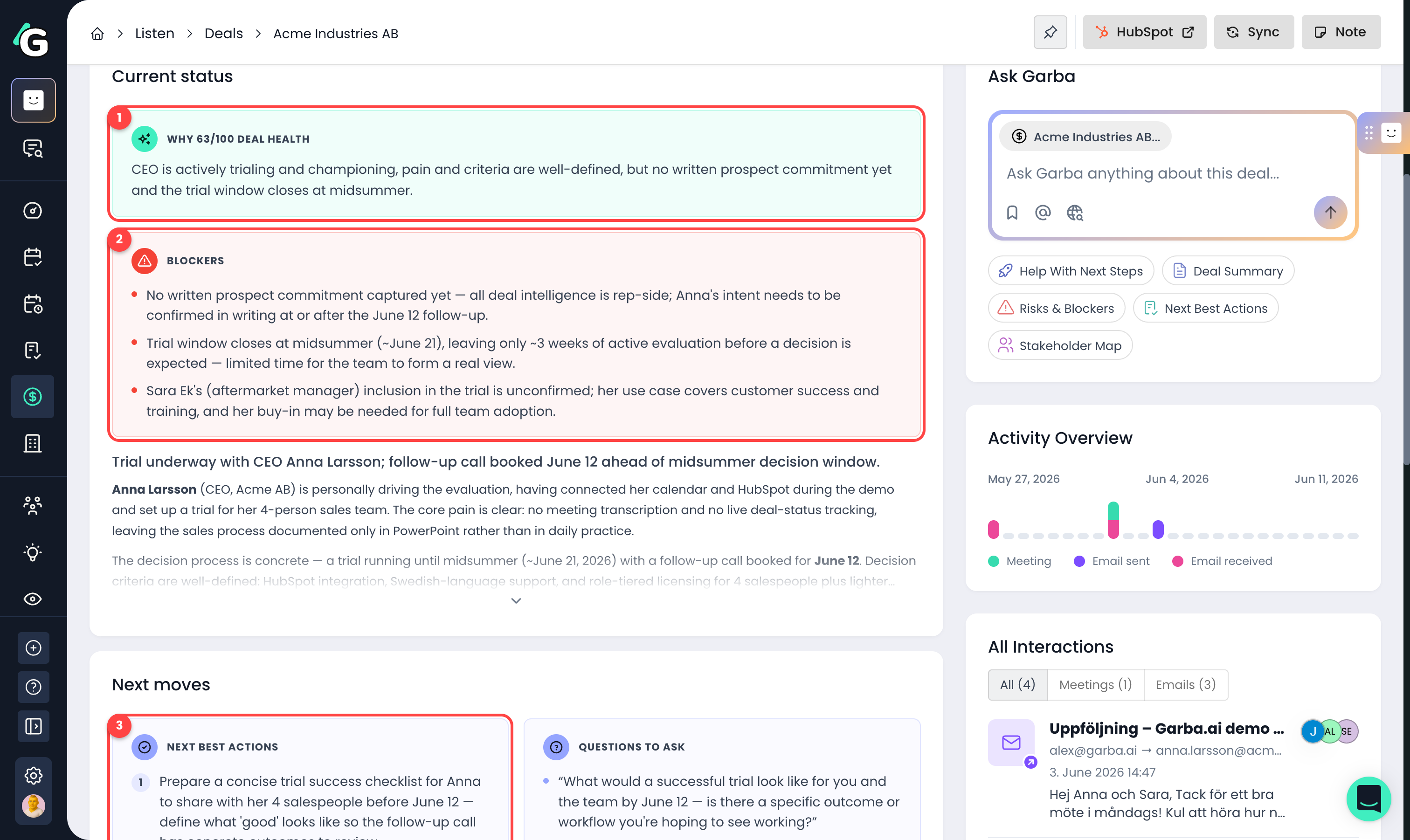
Why this health score — a one-line justification of the current score.
Blockers — the top things standing between you and a closed deal.
Next best actions — concrete recommended steps, plus suggested questions to ask the prospect in your next conversation.
If a deal has had no meetings or emails for 14 days (and no future meeting is booked), a No recent activity warning appears here too.
The Playbook scoring card breaks the score down per criterion.
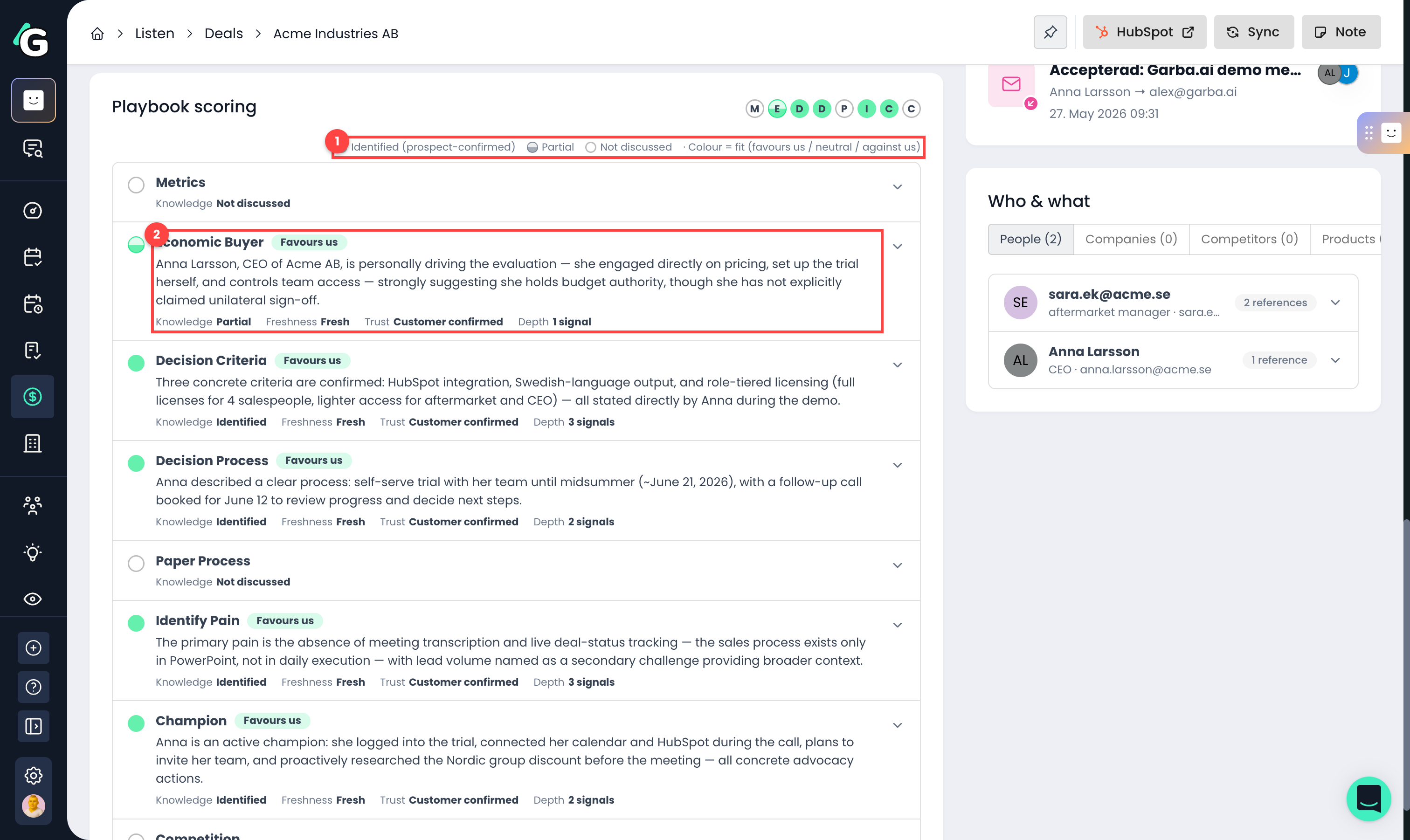
Legend — circle fill shows knowledge (identified / partial / not discussed), colour shows fit (favours us / neutral / against us).
Criterion row — each criterion shows a summary, a fit chip, and four facts explained below.
Knowledge — how much we know. "Identified" means the prospect has confirmed this criterion; "Partial" means there's evidence but nothing the prospect has confirmed yet; "Not discussed" means no fresh evidence at all. This is completeness only — it says nothing about whether the news is good.
Freshness — the age of the newest evidence, measured against the criterion's recency half-life (the same clock the scoring math uses to decay evidence). "Fresh" means recent and near full weight; "Aging" means decay is in progress; "Stale" means the evidence has lost most of its weight and needs re-validating in a new conversation.
Trust — who voiced the evidence. "Customer confirmed" is the strongest; "Mixed voice" means both customer and rep statements exist; "Rep-said only" weighs less in the score and can never confirm a criterion on its own.
Depth — how many evidence signals back this criterion. Expand the row to read them.
Fit is a separate axis from knowledge: it tells you whether the prospect's stance helps or hurts you on this criterion, based on the sentiment of the evidence (−1 to +1). Above +0.2 shows Favours us (green), below −0.2 shows Against us (red), and anything in between is Neutral (grey). If the evidence points both ways within the recency window, the tooltip calls it out as conflicting and shows the positive vs negative count.
Click a criterion to see the evidence behind it:
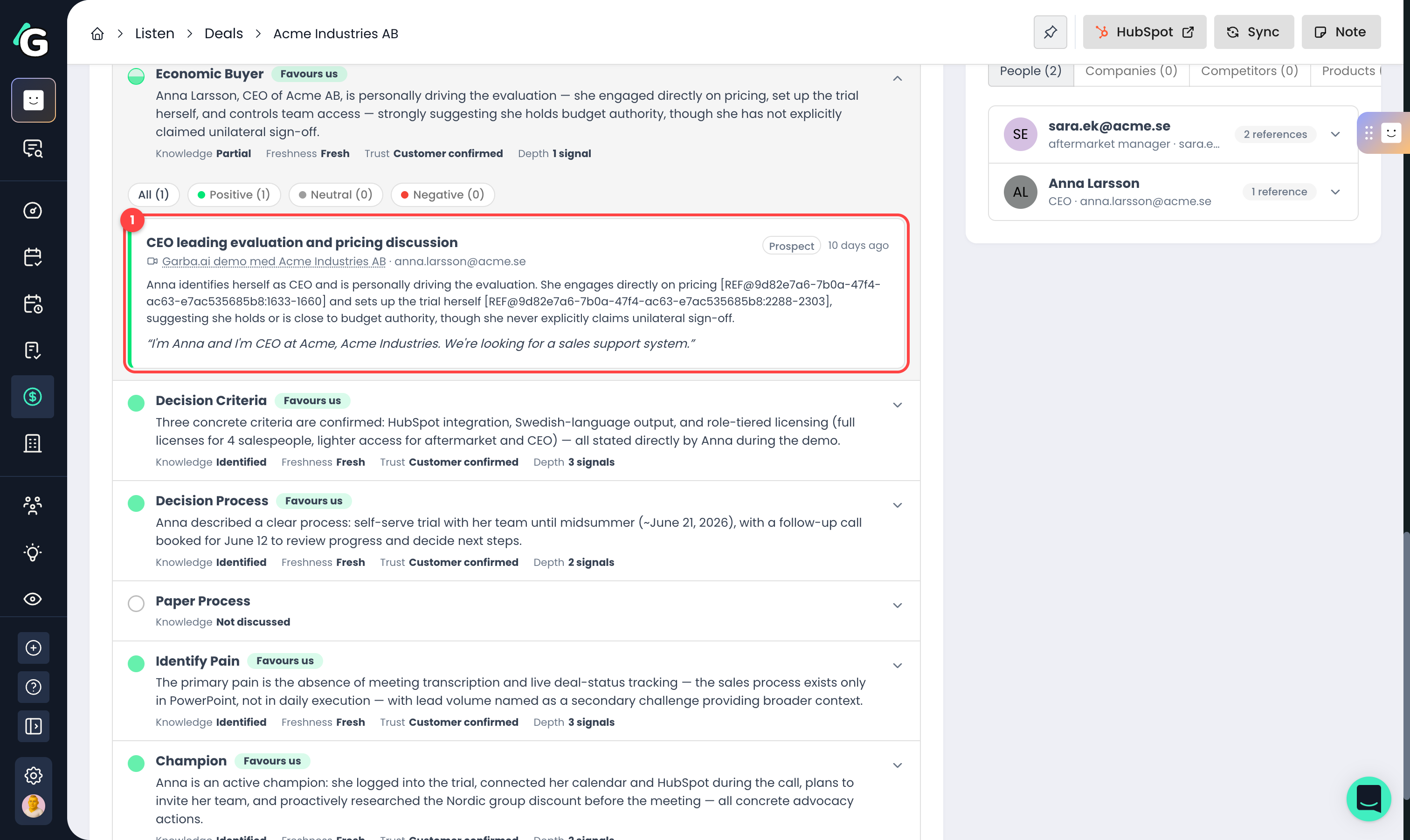
Evidence card — the exact quote, who said it ("Prospect", "Confirmed in thread", or "From rep"), which meeting, call, or email it came from, and how recent it is. Each card is tinted on the left edge by whether it's positive or negative for the deal.
You can also add your own observations with the Note button on the deal — notes flow through the same evidence extraction and affect the score.
Only open deals are scored — won or lost deals keep their last score.
Calls recorded through a connected phone system count as meetings — in the "Based on" sources, the activity timeline, and the evidence cards.
A criterion only counts as fully "Identified" when the prospect themselves confirmed it; rep-only statements count less and can never confirm a criterion alone.
Recent evidence weighs more than old evidence — each criterion has a recency half-life, and very old evidence fades out of the score.
More content means a more confident score: the "Based on" card shows how many meetings, emails, and notes the score is built from.
A deal counts as stalled after 14 days without meetings or emails — unless a future meeting is already booked.
Scores refresh automatically after each new meeting, call, email, or note on the deal (with rate limits, so a busy deal updates at most a few times per day).
Setting up deal scoring requires an admin role, and the Deals feature must be enabled on your subscription.
