Structure your organization in Garba
Teams control what each user can see in Garba. Every user belongs to exactly one team, and that team's access level decides which teams' meetings and emails its members can see.
Only Admins can create or delete a team and set its access level. A Manager can manage the members of their own team, and can move a user to another team from the user's row on the Users page.
A team's access level decides what its members can see:
Public past and upcoming meetings
Meeting summaries and analytics
Synced emails
Important: The access level controls what a team can see — not who can see that team. Setting a team to Own team only or Only you does not hide that team's meetings from the rest of the organization.
To stop a meeting or email being seen by others, mark it Private. That is the only setting that hides content.
🏛 All teams – Members can see the public meetings and emails of every team in the organization
🤝 Own + selected teams – Members can see their own team's, plus those of the specific teams you select
👥 Own team only – Members can see only their own team's meetings and emails
👤 Only you – Each member can see only the meetings and emails they own
Managers and Admins keep their wider access. A Manager on an Only you team still sees their own team members' meetings and emails, and an Admin sees everything in the account that is not private.
Note: Private meetings and emails always remain private, regardless of team access settings — including from Managers and Admins.
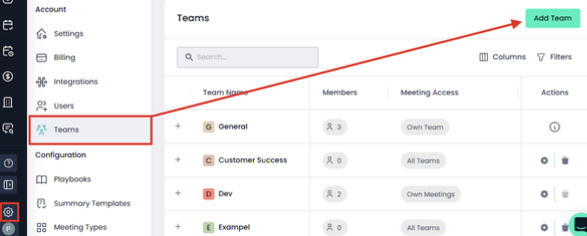
Go to Settings → Account → Teams → Add Team
Name the team (e.g., Sales, CS, Implementation)
Set the team's Meeting And Email Access level
Add users to the team
Add meeting types to the team
Tip: Choose whether managers belong to their team or have their own.
Managers who join the team they lead can keep meetings private by default and make them public only when needed.
Recommended for most organizations
Ideal for handovers between Sales → CS → Implementation → Support.
Configure the team that needs to see, not the team being seen. To let Customer Success follow up on the sales conversation, you give Customer Success access to Sales.
Team access level: Own + selected teams
Customer Success → select Sales
Implementation → select Customer Success
Support → select Implementation
Outcome:
Each team sees the history it needs to pick up the customer
Clean handovers with no oversharing
Better alignment across the customer journey
Important:
Users should still mark sensitive meetings as Private.
Best for small teams or organizations focused on shared learning
Team access level: All teams, set on every customer-facing team
Outcome:
All customer-facing teams see each other's meetings
Ask Garba, Strategic Insights, and Playbook scoring become more accurate
Great for open collaboration cultures
Important:
Sensitive meetings still need to be marked Private.
For teams that do not need the rest of the organization's context
Team access level: Own team only
Outcome:
The team sees only its own meetings, which keeps their view focused
Useful for teams whose work has little overlap with other teams
Note:
This limits the organization-wide insights available to the team, and it does not keep the team's own meetings from other people. A leadership or HR team that needs its discussions kept confidential should mark those meetings Private instead.
Rare and generally not recommended
Team access level: Only you
Outcome:
Each member sees only their own meetings
Limited collaboration, and insights become isolated to the individual
Managers still see their team's meetings, and Admins still see the account
Use only when:
A role has no need of anyone else's meetings. To make a meeting confidential, mark it Private — this setting does not do that.
Team access levels decide what people can see; they never hide anything. A meeting or email is hidden only when it is marked Private, which limits it to its owner and its participants — no one else, not even a Manager or an Admin.
Each user also has a Default Meeting And Email Privacy setting in User Settings that decides whether their new meetings and emails start out public or private.
