
Garba lets you fully customize the branding and messaging in your opt-out emails. You can create a single template that applies to the entire account or set unique templates for individual teams.
Creating an Opt-Out Email Template
Click New template
Select Opt-out email
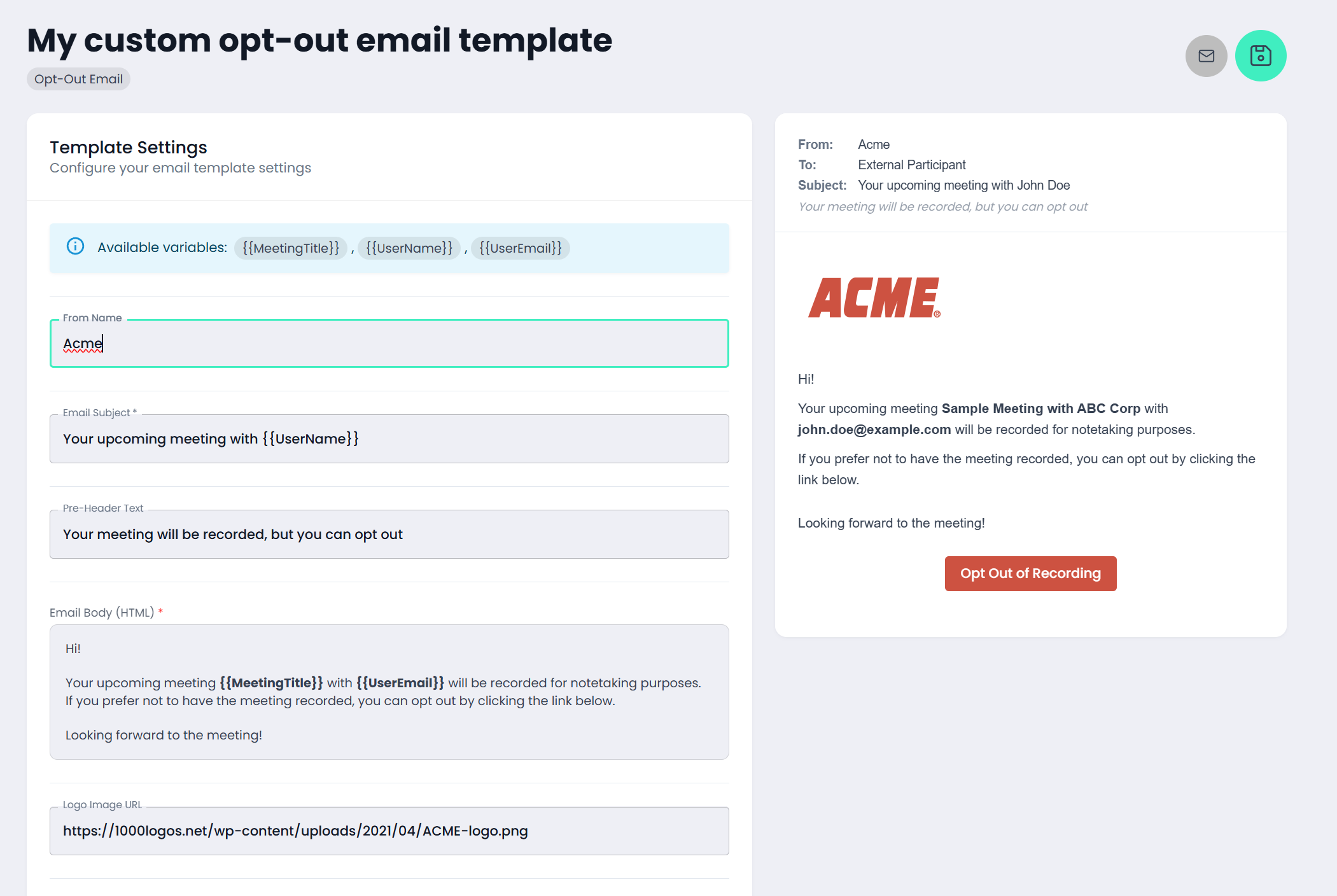
Template Fields
You can customize the following:
From name: The name displayed as the sender
Email subject: The subject line of the email
Email body: The main message
Logo image URL: A link to your logo
Logo width: How wide the logo should appear
Button text: Text displayed on the action button
Button color: Color of the action button
Text color: Color of the text on the button
Use the email icon in the top right corner to send yourself a preview.
When you're satisfied with the template, click the green Save button.
Activating the Opt-Out Email
Saving a template does not automatically activate it. You must enable it at the account level or team level.
Activate for the Entire Account
Scroll to Opt-out Email Template
Select the template you want to use

Activate for Specific Teams
If different teams need localized or customized versions (for example, different languages), follow these steps:
Ensure each template is created as described above
Select the team
Choose the appropriate template under Opt-out email template