
Overview
If you’ve connected Garba to Slack, you can automatically send specific meeting insights directly into your team’s Slack channels. This helps you keep everyone aligned by surfacing important insights where your team already works and communicates.
🔑 Why Use Slack Integration?
Spot churn risks early – Send churn signals from customer meetings into your Customer Success channel
Capture feature requests – Route requests directly into your Dev Team channel for quick visibility
Celebrate wins – Share positive feedback and praise into a Feedback/Morale channel to keep spirits high
🚀 How to Set It Up
Go to Summary Templates
Navigate to your Summary Templates page in Garba
Select a Template
Choose a template that contains the insight you want to send to Slack
Enable Slack Notifications
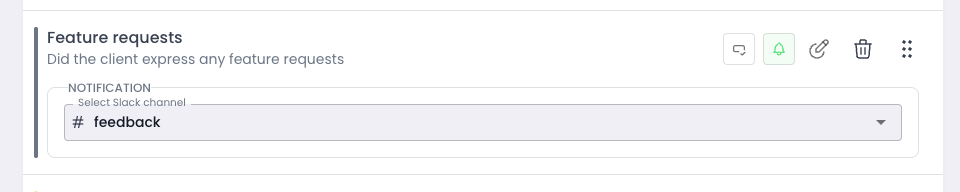
To the right of each insight, you’ll see a bell icon
Click the bell, then choose the Slack channel where the insight should appear
Automatic Delivery
Once set, every time that insight is detected in a meeting, it will automatically be sent to the selected Slack channel
✅ Best Practices
Use dedicated channels (e.g.,
#customer-churn,#feature-requests) to keep insights organizedCombine Slack notifications with Strategic Insights to both track trends and keep real-time visibility